Time Range
Control the query time window with relative or absolute expressions
The time range selector controls the $time parameter in your query. It appears in the toolbar to the right of the editor controls. Click it to open the time picker popover.
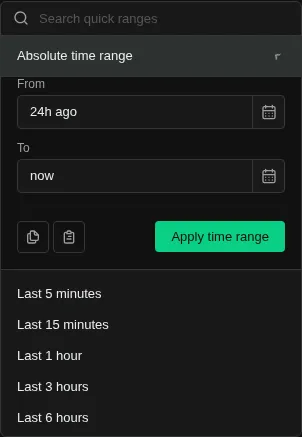
Quick Ranges
Select a preset window — 5m, 1h, 24h, 7d, or others — to set a relative range with one click. Relative ranges move forward as time passes, so re-running the query always shows the latest data.
Absolute Timestamps
Expand the Absolute section to pin the range to specific start and end times. Type timestamps directly or use the calendar picker. This is useful when you want to share a link or revisit the exact same data later.
Copy & Paste
Use the Copy and Paste buttons in the time picker to transfer a time range between tabs or share it with a colleague. Copy serializes the current range to the clipboard; paste applies a previously copied range.
Navigation
The back and forward arrows next to the time selector shift the window by its own duration. For example, if you're looking at a 1-hour window, clicking forward advances to the next hour.
Scope
The selected range applies to the current tab only. Different Explore tabs can use different time ranges for parallel investigations.