Alerts
Create alert rules, backtest thresholds and grace periods, and investigate firing alerts
An alert compares a numeric query result with critical and optional degraded thresholds. Each group in the result, such as a service or host, has its own state. Rules evaluate completed time intervals and notify your configured connections when that state changes.
Create a rule
- Open Alerts → Rules, then Create → New alert.
- Give the rule a title and select its database and table. Start from Templates or use an example query.
- Return a datetime bucket column, a numeric measurement, and any group labels.
The usual column names are
timestampandvalue. - Choose the comparison and Critical threshold. Use Add degraded threshold for an earlier warning level.
- Set Check every, Ingestion delay, and the For and Keep firing grace periods. See evaluation and recovery for their exact meaning.
- Inspect the historical preview. Add a notification connection, save the rule, and enable it when the query and timing are ready.
Create notification destinations in Settings → Integrations. Add a channel to receive external notifications; without one, firing state is still visible in Berserk. Leave the rule disabled while tuning; the preview works without enabling scheduled evaluation.
Backtest before enabling
The editor's time selector controls the historical preview range. It does not change the rule's evaluation interval. Select a period containing both normal behavior and an incident, then inspect the measurements, threshold lines, and firing intervals.
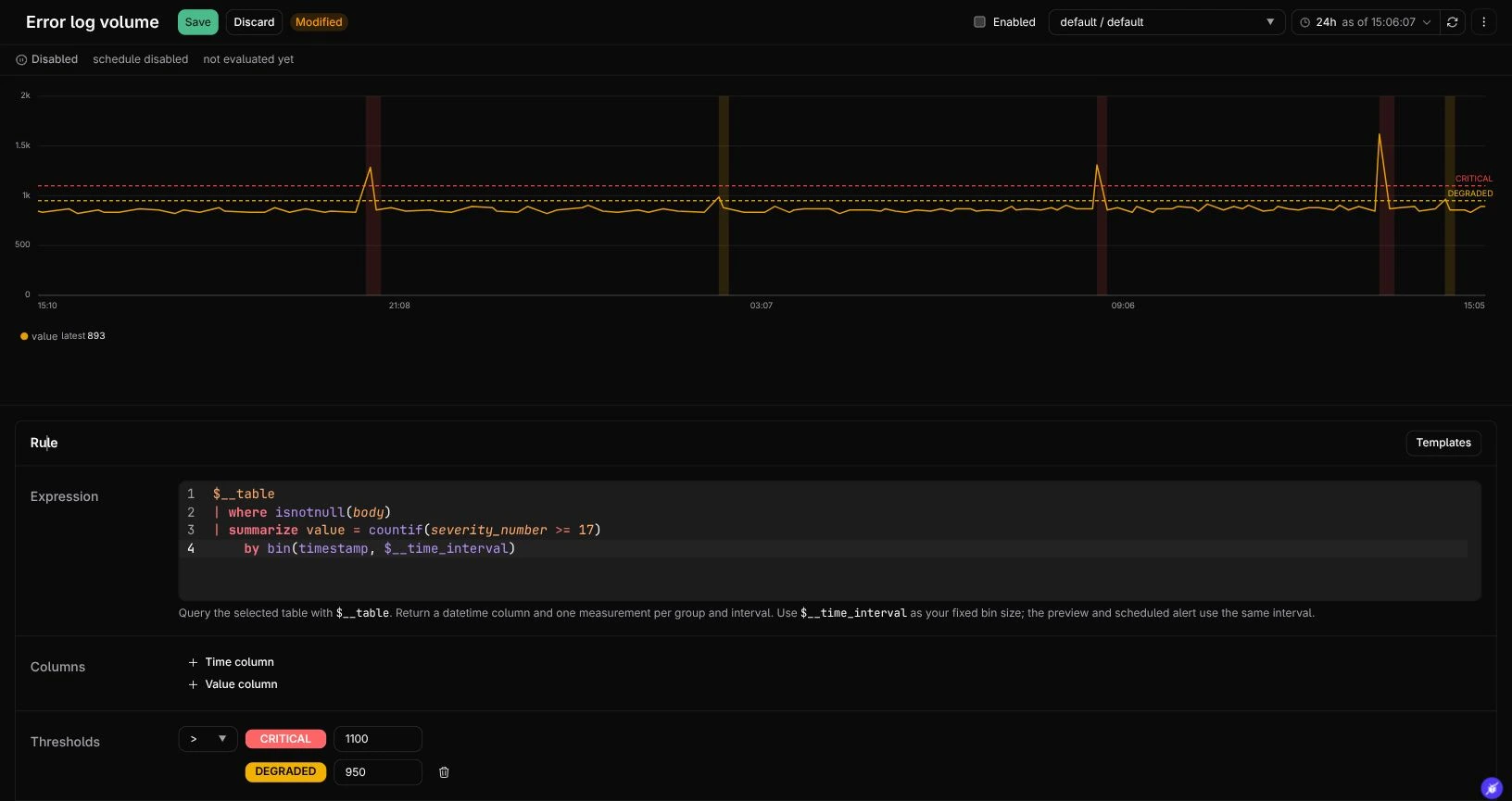
The example shows 24 hours of real log counts in five-minute intervals, with illustrative thresholds of 950 for degraded and 1,100 for critical. It fires after one breaching interval and recovers after two healthy intervals. A disabled rule can show firing intervals in its backtest: those are simulated historical transitions, not active notifications.
The preview runs the query over complete intervals in the selected range and replays the same threshold and grace-period rules used by scheduled evaluation. Changes to the thresholds or grace periods let you see which breaches would have fired and how long recovery would have taken. Preview never sends notifications or changes a group's live alert state.
Historical replay starts without evidence from before the selected range. Include enough preceding intervals to cover the grace periods. It uses data available now, without the live ingestion delay or watermark wait. Late data can therefore change a backtest after the original live evaluation; preview is not an audit of what was known at that time. Missing measurements remain gaps, and failed or partial queries are errors.
Investigate firing alerts
Open Alerts → Firing Alerts to inspect current firing groups and recorded transitions. Recovery to healthy is also a transition. Open the rule to inspect its query and recent measurements; use Runs to investigate whether a scheduled evaluation succeeded or failed.
Notifications follow state changes, including escalation and recovery. The Keep firing field delays recovery; it is not a repeat-notification timer. If an evaluation catches up over several intervals, it retains the transition history but coalesces notifications per group, avoiding a new page for an incident that has already recovered within that batch.
Delivery status is separate from alert severity. A failed notification does not make an alert healthy. An unknown delivery means confirmation was lost around a send; it is not confirmed success and is not automatically resent as if nothing happened.